In this guide 6 sections
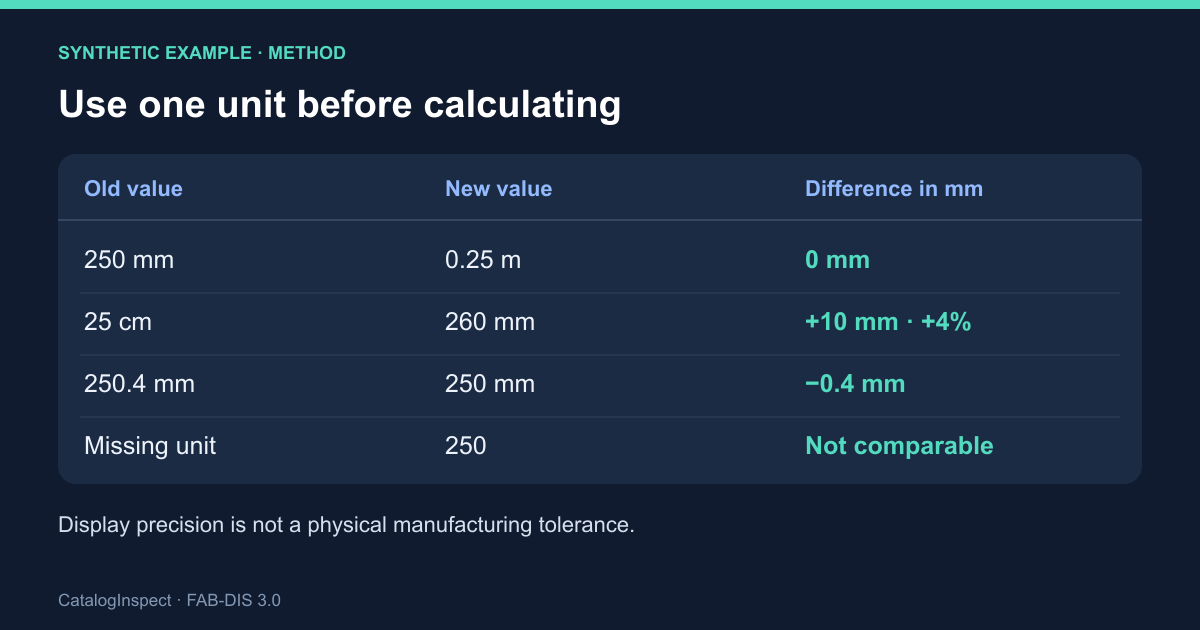
To check supplier catalogue dimensions, convert every value to millimetres first (1 m = 1,000 mm, 1 cm = 10 mm), subtract, and round only when you display the result. On that basis 0.25 m and 250 mm are the same length, while a move from 25 cm to 260 mm is a real difference of +10 mm, or +4%.
The same discipline applies when you review two FAB-DIS 3.0 editions from the same manufacturer: a change of unit is not a change of product, but a changed number in the same unit needs an explanation. The method below covers the conversion, what to check before converting, when to round and what to do when the unit is missing.
How to convert mm, cm and m to one unit
The BIPM table of SI prefixes defines centi as 10⁻² and milli as 10⁻³. For lengths, that gives three factors to millimetres:
| Unit in the catalogue | Multiply by | Example | Result in mm |
|---|---|---|---|
| metre (m) | 1,000 | 0.25 m | 250 |
| centimetre (cm) | 10 | 25 cm | 250 |
| millimetre (mm) | 1 | 250 mm | 250 |
| inch (in) | 25.4 | 10 in | 254 |
The inch factor comes from the GS1 Package and Product Measurement Standard 3.2, which sets 1 inch = 25.4 mm for data exchanged between metric and imperial systems.
Then follow the same steps for every row:
- Read the raw value and its unit from the same row or the same declared scope.
- Multiply by the factor to millimetres, keeping every decimal.
- Calculate new minus previous, in millimetres.
- Calculate the relative change: difference ÷ previous value.
- Format the displayed answer, and keep the raw values, units and factor next to it.
| Synthetic item | Previous value | New value | Previous in mm | New in mm | Difference |
|---|---|---|---|---|---|
| A | 250 mm | 0.25 m | 250 | 250 | 0 |
| B | 25 cm | 260 mm | 250 | 260 | +10 mm (+4%) |
| C | 250.4 mm | 250 mm | 250.4 | 250 | −0.4 mm |
A is equal after conversion: only the representation changed. B changes by 10 / 250 = 4%. C differs numerically, but the cause could be rounding, a corrected measurement or a physical change, and the figures alone cannot tell you which.
Convert dimensions before calculating a volume
Convert each side before multiplying. A synthetic case of 400 × 250 × 300 mm is 0.4 × 0.25 × 0.3 m, or 0.030 m³. Multiplying the millimetre values and converting afterwards gives the same result only if you divide by 1,000,000,000, which is an easy place to lose three zeros. The FAB-DIS guide to the mandatory blocks asks for volumes to three decimal places, without rounding.
Check what is being measured before you convert
A conversion is only meaningful between two values of the same quantity, for the same object, at the same packaging level. An unpackaged product length cannot be compared with its shipping-case length, and a dimension cell cannot be compared with a weight cell merely because both sit in corresponding columns.
The FAB-DIS guide places dimensions and weights of packaged and unpackaged articles in block B02 LOGISTIQUE, which also handles articles shipped in several parcels. It lists MMT for dimensions in millimetres, CMT for dimensions in centimetres and KGM for weight in kilograms, and asks you to respect the requested units. Weight follows the same logic with its own pitfalls: see net weight, gross weight and tare in supplier catalogues before comparing kilograms across editions.
Orientation matters too. For a non-consumer trade item, GS1 PPM 3.2 starts from the natural base: height is the distance from that base to the top, width is the shorter side of the base and depth is the longer side. If one edition gives a case as 400 × 250 mm and the other as 250 × 400 mm, check the axis labels before logging two changes; it may be the same box. The standard also expects the three linear dimensions in the same unit of measure.
Finally, record the kind of measurement as well as the number. A nominal length of 250 mm and a maximum length of 250 mm are different statements, even though they convert to the same figure. Where an ETIM feature defines the meaning of a value, align that meaning before converting. The sample difference report between two catalogue editions shows how changed dimensions sit next to prices and pack sizes in a single review.
When to round product dimensions
Round after converting, never before. GS1 PPM 3.2 states that the best practice is to convert between systems first and then apply its rounding rules, which gives the most consistent linear values.
The GS1 rounding rule for millimetres
GS1 PPM 3.2 sets a minimum level of precision for linear dimensions: millimetres are always rounded up to a whole millimetre, so 99.3 mm becomes 100 mm, and inches are rounded up to the nearest 0.05 inch. Under that rule, item C’s 250.4 mm would be published as 251 mm, not 250 mm. A new value of 250 mm therefore points to another convention, a corrected measurement or a physical change: ask the manufacturer rather than guess.
Display precision is not a tolerance
Rounding describes how a value is written. A tolerance describes an acceptable range in a defined context. A catalogue dimension shown without decimals does not prove a product tolerance of ±0.5 mm, and GS1 measurement tolerances for data quality serve a different decision from an installation or fit tolerance. For a technical compatibility decision, obtain the relevant product specification.
Set an alert threshold you can explain
An internal alert threshold reduces noise, provided you state it as your own rule and not as a FAB-DIS, GS1 or manufacturer requirement. With a synthetic threshold of “more than 1 mm”, a 0.9 mm difference does not trigger an alert, exactly 1 mm does not either, and 1.1 mm does. An “at least 1 mm” rule would include the boundary. Test all three cases and write the operator in the report.
What to do when a unit is missing or unknown
A value of 250 with no established unit cannot be converted with confidence. Check whether the unit is declared elsewhere at the right scope, or ask the supplier. Do not assume every row is in millimetres because the first few rows are.
Keep unknown or incompatible unit codes as explicit exceptions. Replacing them with the most common unit produces a complete-looking table built on invented measurements. The same caution applies to empty cells: a blank new value does not mean zero length, and an unchanged dimension does not prove the item was measured again. When a measurement appears in a product description, check its units across the supplied languages before treating a text discrepancy as a physical change.
Checklist before importing new dimensions
- The two values describe the same quantity, object, packaging level and orientation.
- Both units are confirmed, and the conversion factor is recorded.
- The difference is calculated from unrounded converted values, in one unit.
- Rounding is applied for display only, with the convention stated.
- The alert threshold and its operator are written in the report.
- Missing or unknown units stay as exceptions, with an owner to resolve them.
Logistics can then assess storage, transport and bin-capacity effects, product specialists can assess fit, and the manufacturer can confirm whether the source changed because of packaging, product evolution or a data correction. Add these checks to your ERP supplier catalogue import acceptance checklist so that dimension changes are reviewed before the data reaches the ERP.
Frequently asked questions
How do you convert centimetres to millimetres?
Multiply the value in centimetres by 10. For example, 25 cm is 250 mm, and 12.5 cm is 125 mm.
How many millimetres are in a metre?
There are 1,000 millimetres in a metre, so 0.25 m equals 250 mm. To go from millimetres back to metres, divide by 1,000.
Should product dimensions be rounded up or down?
The GS1 Package and Product Measurement Standard rounds millimetres up to a whole millimetre, so 99.3 mm becomes 100 mm. Whatever convention you use, convert first, calculate the difference on unrounded values, and state the rounding rule in your report.
Is a 1 mm difference between two catalogue editions a real change?
Not necessarily. It may come from rounding, a corrected measurement or a physical change, so check the source values and ask the manufacturer if the dimension affects storage, transport or fit.
In what order are height, width and depth given?
GS1 defines them from the natural base of a non-consumer trade item: height runs from the base to the top, width is the shorter side of the base and depth is the longer side. Check the axis labels in each edition before treating swapped values as a change.
Official sources & scope
- BIPM — SI prefixes (new tab)Accessed on
- FAB-DIS — B02 LOGISTIQUE (new tab)Accessed on
This guide describes a working method. The examples are fictional; the official documentation remains the reference for the format rules. CatalogInspect is an independent service.