In this guide 10 sections
An ERP supplier catalogue import is accepted only when the values stored in the item records match the approved batch, not when the import log says “completed”. Reconcile the approved batch with the ERP’s result, read back the target fields for a risk-based set of product codes, check what happened outside the batch, and test the recovery procedure before go-live.
Technical completion and business acceptance are separate findings. This checklist starts after you have reviewed two FAB-DIS 3.0 editions from the same manufacturer and decided which changes to load; the import itself runs in your own ERP, whose documentation defines its mapping, validation and rollback behaviour.
What to test before an ERP supplier catalogue import goes live
Run the full checklist in a test environment where your process provides one, then repeat the reconciliation and read-back on the live update. Seven checks cover most failures:
| # | Check | Evidence to keep | Blocks go-live if |
|---|---|---|---|
| 1 | Approved batch frozen | Batch file, excluded rows, source editions, effective date | The batch changed after approval |
| 2 | Counts reconciled | Submitted rows vs ERP successes and rejections | Any row is unaccounted for |
| 3 | Target values read back | Expected vs observed value per checked code | A price, unit or identity is wrong |
| 4 | Out-of-batch items unchanged | Before and after values for untouched codes | An item outside the scope moved |
| 5 | Transformations checked | Decimals, leading zeros, units, dates, blanks | Meaning changed during the load |
| 6 | Dependent calculations checked | Selling prices, costs or rules triggered by the import | A recalculation left the intended scope |
| 7 | Recovery tested | Restored values on a test scope, named decision owner | Restoration has never been tried |
Each check resolves to met or not met. If the condition in the last column occurs, the affected changes do not go live; a minor finding outside these seven checks can proceed only with a named owner and a dated fix. Checks 3 and 4 are easier when the catalogue difference report on the features page already lists, code by code, which fields changed between the two editions.
Freeze the approved batch
Save the accepted product codes, the fields allowed to change and the excluded rows through an approval matrix with evidence and owners. Link the batch to its source editions and effective date. The FAB-DIS 3.0 guide explains the data model on the supplier side; your ERP’s documentation defines how each field is mapped and stored.
Export the relevant initial state before testing: the current values of every field the batch may touch, for the codes in the batch and for a set of codes outside it. Use the appropriate permissions and keep sensitive operational data in the authorised internal location.
Establish what happens to items missing from a partial file. Do not assume that they remain untouched merely because their rows are absent; the scope of a partial or full supplier catalogue decides whether an absence means “no change” or “check this item”. In FAB-DIS 3.0, discontinued references are listed in a dedicated ARRET block rather than in COMMERCE, according to the guide’s conditional blocks page, so a missing row is not by itself an instruction to deactivate an item.
Define the expected result for blank cells too. Clearing a field, keeping its previous value or rejecting the row are three different outcomes, and each needs its own expected value in the test.
Define measurable acceptance criteria
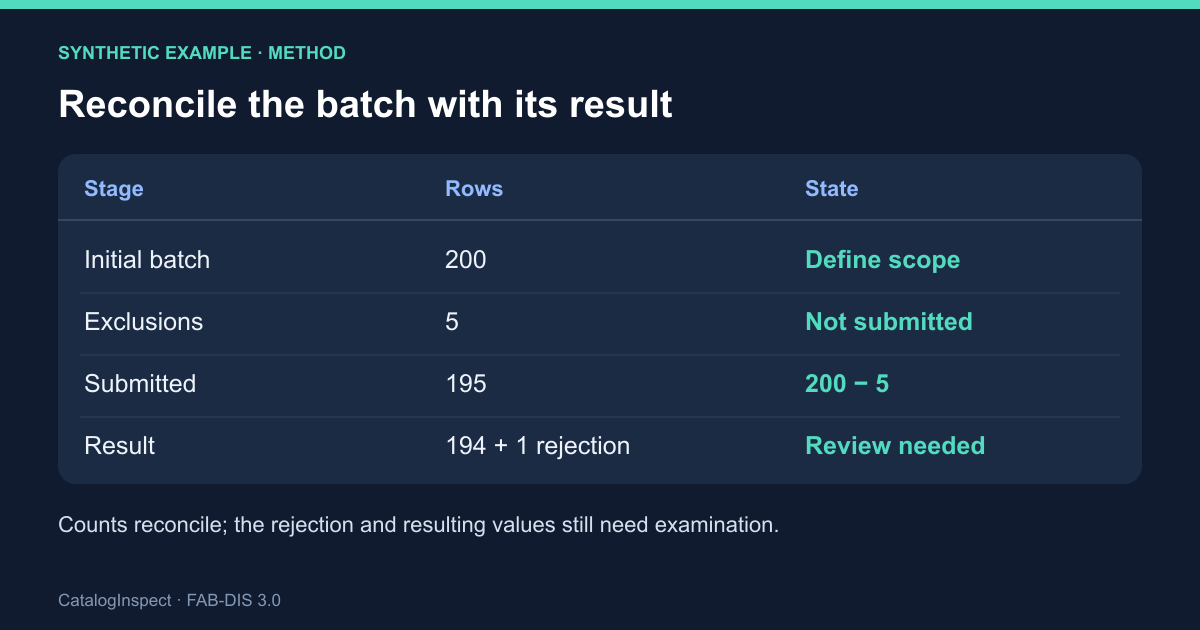
Record expected row counts and the important target values before the run. In a synthetic batch of 200 rows, five deliberately excluded rows leave 195 to submit. An import report with 194 successes and one rejection reconciles the submitted count, but does not establish full acceptance.
| Synthetic stage | Count | Check |
|---|---|---|
| Initial batch | 200 | Check that the operation keys are unique |
| Approved exclusions | 5 | Not submitted |
| Submitted rows | 195 | 200 − 5 |
| Reported successes | 194 | Resulting values still require checks |
| Rejection | 1 | Cause and decision required |
Does a matching row count prove the import is correct?
No. Matching totals are necessary but insufficient. Two prices assigned to the wrong product codes leave the record count unchanged, and so does a pack size loaded into the wrong unit. Reconcile identities and resulting values, not only the headline numbers.
How many items to check after the import: select cases by risk
Include the largest cost movements, a new product code, an absent code that must remain active, a changed unit, a changed minimum order quantity and an empty value. Add unchanged and out-of-batch codes to detect unintended effects.
This is a reasoned sample, not a statistically representative one. It does not support a claimed catalogue-wide error rate. If your tools and volume permit, compare every imported field against the approved batch for stronger evidence; a full read-back export joined to the batch on product code is often simpler than it sounds.
For every case, record the expected and observed values and keep the relevant ERP export or screen as evidence. If your ERP first loads data into a staging area, check both that intermediate load and the item records used by purchasing or logistics. Record which view or export supplied each observed value.
A synthetic target check can expose an error despite a successful row status:
| Case | Previous state | Expected result | Observed result and verdict |
|---|---|---|---|
| Approved price | 10 per piece | 11 per piece | 110 per piece: reject the result and investigate conversion |
| Identifier | Text 00123 | Same complete identifier | Text 00123: identity check passes |
| Out-of-batch item | 20 per piece | Unchanged 20 per piece | 20 per piece: scope check passes |
The two passing checks do not override the wrong price. Keep leading zeros in product codes with a matching key before the import and check the resulting identity again afterwards.
Test transformations that can change meaning
Check decimal separators, leading zeros, code length, currency, units and dates. A price written 8,50 in one edition and read with a different locale can arrive as 850; see how to convert prices with a decimal comma using a locale before the file reaches the ERP.
Tabular data rules help frame the expected behaviour. The W3C tabular data model treats an empty cell as null unless a default value is declared, and keeps a value that does not match the declared datatype as a string with a validation error. Your ERP may apply different rules, which is exactly why the expected result for each case must be written down before the test.
Where the ERP applies rounding or calculations, verify their effects. A correctly imported purchase price can trigger an unintended selling-price recalculation outside the intended scope.
Review dates at the boundary as well as in the middle of the period. A future price accepted by the import can still become active at the wrong time if the destination rule was misunderstood.
Check field mapping, intermediate values and final destination values separately, and adapt the trial to the actual system contract. Use the documentation for your own ERP and version; one system’s workflow or recovery option does not transfer to another.
Rollback: prepare recovery before the live update
Determine how previous values can be restored using the software’s documented capabilities. Reimporting an old file may be insufficient if the operation created items, triggered calculations or affected open orders.
Test the recovery procedure on the relevant scope and name the person responsible for deciding whether to invoke it. An available backup is not the same evidence as a tested restoration.
Go or no-go: blocking and non-blocking findings
Stop release of affected changes when identity, unit or effective date is wrong or unexplained. In the 195-row example, accepting the 194 reported successes is justified only after their required value checks pass and their dependencies on the rejected row are cleared. Keep that one rejection blocked, with a named owner and a documented resubmission plan. If the destination cannot enforce that separation, hold the indivisible batch instead of calling it partially accepted.
A cosmetic difference, such as a description truncated by a field length the business has already accepted, can proceed with a dated fix. Write the distinction down before the test so that the go or no-go decision does not depend on who is in the room.
Acceptance checklist before approving the import
- Before testing, record the approved batch, excluded items, expected field values and the recovery procedure.
- After the test, reconcile the submitted rows against the ERP log. Read the expected fields back from the item records in use and check at least one excluded and one out-of-batch item.
- Record the outcome for rejected rows and identify who owns the next attempt. Use the recovery procedure if a critical value is wrong.
State exactly what was accepted
The final record should identify the batch, ERP version, environment, checked criteria, unresolved rejections and decision. Successful testing in a test environment does not establish that a production import has occurred; repeat the reconciliation and read-back on the live run.
The edition comparison sits upstream of this acceptance process. Together, edition review and destination verification connect approved catalogue changes to the values actually held in your system.
Frequently asked questions
What should you test before an ERP catalogue import goes live?
Test that the approved batch is frozen, that submitted rows reconcile with successes and rejections, and that stored prices, units and identifiers match the expected values. Also check items outside the batch, dependent calculations and a tested recovery procedure.
How many items should you check after a supplier catalogue import?
Check a reasoned set chosen by risk: the largest price movements, new and absent codes, unit and minimum order changes, empty values and a few untouched items. If volume allows, read back every imported field and compare it with the approved batch.
Does a successful import log mean the catalogue data is correct?
No. A log confirms that rows were processed, not that each value reached the right product code in the right unit. Only a read-back of the stored values against the approved batch supports acceptance.
How do you roll back a supplier catalogue import?
Export the previous values of every field the batch may touch before the run, and restore them with the method your ERP documents. Test that restoration on a limited scope first, because reimporting an old file may not undo created items or triggered recalculations.
Should discontinued products be deleted during the import?
Not automatically. In FAB-DIS 3.0, discontinued references are listed in the ARRET block rather than in COMMERCE, so decide deactivation explicitly and check open orders and replacement items before changing their status.
Official sources & scope
- FAB-DIS — Guide officiel 3.0 (new tab)Accessed on
This guide describes a working method. The examples are fictional; the official documentation remains the reference for the format rules. CatalogInspect is an independent service.