In this guide 8 sections
To keep leading zeros in product codes, read the code column as text before any conversion and never let it be stored as a number: once 00125 has become 125, the zeros can only be recovered from the original file. Then build a separate matching key from that raw text, apply one documented transformation at a time and check for collisions before you join two catalogue editions.
Removing every space, dash and leading zero can raise the match count while making the result less trustworthy. This guide uses two editions of the same manufacturer’s catalogue, such as two FAB-DIS 3.0 files, but the method applies to any pair of supplier price lists.
Why do product codes lose their leading zeros?
A spreadsheet that guesses column types reads 00125 as the number 125, and a number has no leading zeros. The same guess can turn a long numeric code into scientific notation or a code such as 1-2 into a date. A 13-digit GTIN is a typical victim, and verifying the GTIN-13 check digit is a quick way to catch a code that was altered on the way. Nothing warns you: the file opens, the row count is right and the damage only shows when codes stop matching.
A display format can hide the problem. A cell that shows 00125 because a padded number format is applied still stores 125, so it is not evidence that the original value contained those zeros. Check the stored value, not what the screen displays.
If information has already been lost, return to the received file. Padding every code to an assumed length can invent a code that the manufacturer never issued. It is defensible only when the manufacturer has documented that exact coding convention.
How to keep leading zeros when you read a supplier file
- Keep the received file unchanged. Work on a copy and keep the original as the reference for every disputed value.
- Read the code column as text. Set the column type to text before the data is loaded, not afterwards. The step-by-step settings for delimited files are in import CSV into Excel with UTF-8, delimiters and quotes.
- Compare against the original. Count the codes that start with
0in the received file and in your copy, and compare the shortest and longest code lengths. Any difference means a conversion happened. - Keep the context columns. Retain brand, edition, sheet and row beside each code. A code may be unique within one brand while appearing under another brand in the same manufacturer file; do not broaden its identity scope by accident.
The W3C model for tabular data separates a cell’s string value, its original representation in the file, from the value obtained after interpreting it. Keep that string value as the raw code, and treat every later form as a derived key. Treat GTINs the same way, and when the GTIN of an existing product code differs between editions, review the changed GTIN and the product identity before you match on it.
With both editions read this way, you can join two price lists on product code and keep the codes that exist on only one side. A supplier catalogue comparison depends on that key being right before any price is read, and the fictitious difference report between two editions shows the added, missing and changed codes that result.
How to build a product code matching key
A product code matching key is a working column derived from the raw code and used only to pair rows. It never replaces the raw code. Keep four values for each row: the raw code, the key, the transformation that produced it and the matching status.
Run exact text matching first, within the same brand. For the rows that remain unmatched, test one transformation at a time and keep the result of each step, so you can see what it recovered and what ambiguity it introduced.
| Synthetic source value | Proposed transformation | Question to resolve |
|---|---|---|
␠A-01␠ | Trim outer spaces | Are these accidental spaces? |
a-01 | Convert to uppercase | Is case irrelevant here? |
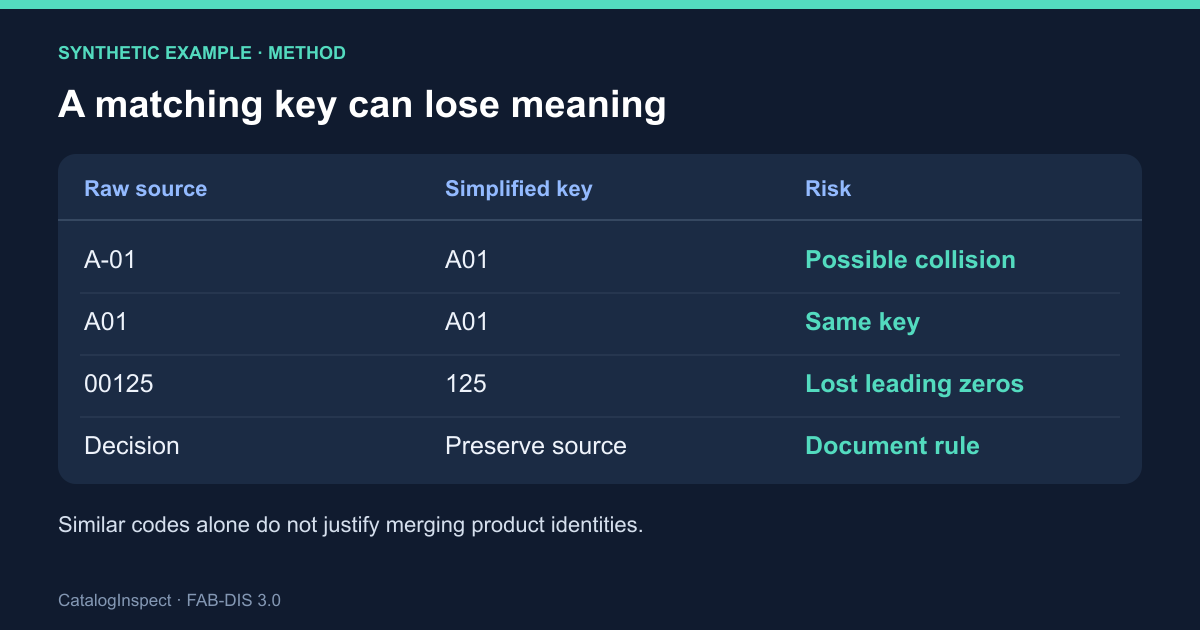
A-01 and A01 | Remove the dash | Could these be separate codes? |
00125 and 125 | Convert to a number | Does this destroy identity? |
The symbol ␠ marks a space in the source value. Use the manufacturer’s coding rules to decide which characters carry meaning.
Should you remove spaces, dashes and leading zeros?
Each transformation answers a different question. Accept it only for the brand or product family where the evidence supports it.
Outer spaces
Leading and trailing spaces are usually export noise, but confirm it on a sample. Watch for characters that look like a space, such as a non-breaking space: they survive a plain trim and keep two identical-looking codes apart.
Upper and lower case
Converting to uppercase is safe only if the manufacturer does not distinguish a-01 from A-01. Check whether both forms exist in the same edition before applying it.
Dashes, dots and slashes
Punctuation often carries meaning. A-01 and A01 may be the same item written two ways or two separate items. Removing the dash is an assumption to test against collisions, not a cleaning step.
Leading zeros
Stripping zeros from both sides makes 00125 and 125 meet, but it also merges 0125 and 125 if both exist. Prefer restoring the raw text from the received file. GTINs are a documented exception: GS1 Australia’s product catalogue data dictionary requires every GTIN on 14 digits, with leading zeros for shorter GTINs, so the GTIN-13 9312345678914 is entered as 09312345678914. That rule belongs to GTINs, not to a manufacturer’s own product codes.
How to detect collisions before you join
For each proposed key, count the distinct raw codes within the same brand and edition. If both A-01 and A01 become A01, the transformation has discarded distinguishing information. Send that group to review instead of taking the first available row.
A synthetic example with 1,200 codes in the old edition shows how the count can mislead:
| Step | Rows newly matched | New collision groups | Decision |
|---|---|---|---|
| Exact text match | 1,152 | 0 | Accept |
| Trim outer spaces | 21 | 0 | Accept after a sample check |
| Convert to uppercase | 3 | 0 | Accept for this brand only |
| Remove dashes | 9 | 2 | Block the 2 groups, review the rest |
| Strip leading zeros | 6 | 3 | Reject the rule, restore raw codes |
The last two steps add 15 apparent matches, yet they create five groups where one key points to several products. A higher match rate is not a better result if important identities become ambiguous.
Also examine matches across editions. A transformed key may be unique in each file yet link two different products. Uniqueness makes a one-to-one join possible; it does not prove identity.
Never delete apparent duplicates just to make the join finish. Keep the rows, find out why they collide and decide whether the key needs another component, such as the brand.
Record distinct outcomes. In a synthetic example, Q-10 → Q-10 is an exact text match in the same brand. ␠Q-11␠ → Q-11 is a confirmed normalised match only once outer spaces are documented as insignificant. A-01 → A01 stays blocked while identity is unconfirmed, even if each file contains only one such candidate, and is not counted as a successful cleanup.
Use supporting evidence carefully
Manufacturer documentation and identification data can resolve a questionable match. Similar descriptions do not prove equivalence: two items can share wording and differ only in a critical dimension or electrical rating. A different GTIN on a matched code also needs investigation rather than an automatic merge or rejection; the review of a changed GTIN in a catalogue covers that case.
Record the approved rule, its scope and its exceptions. A confirmed mapping table between old and new codes may be safer than a broad transformation. A convention verified for one brand or product family should not become a global rule without further evidence.
Make the matching reproducible
Deliver the old raw code, new raw code, matching key, transformation and confirmation status for every row. Separate exact matches, confirmed normalised matches and unresolved cases. Another reviewer should be able to reproduce the match without guessing which spreadsheet cleanup steps were applied.
Report both the rows each rule recovered and the collisions it created. This discipline is what makes a difference report between two manufacturer editions trustworthy. After matching, classify zero, missing and invalid prices before comparing them: code matching comes first, and it deserves its own evidence before price, pack size or product-data differences influence purchasing or an ERP update.
Frequently asked questions
Why does Excel remove leading zeros from product codes?
The column is read as a number, and a number has no leading zeros. Read the code column as text before the data is loaded; once a code is stored as a number, only the original file can give the zeros back.
Can I add the missing leading zeros back?
Only if the manufacturer documents a fixed code length for that range. Otherwise padding can create a code that was never issued, so restore the values from the received file instead.
Should I remove dashes and spaces from product codes before matching?
Trim outer spaces once a sample confirms they are export noise. Remove dashes or other punctuation only after checking that no two distinct codes collapse into the same key within the same brand and edition.
How do I find product codes that collide after normalisation?
Group the rows by brand, edition and matching key, then count the distinct raw codes in each group. Any group with more than one raw code is a collision that needs review before the join.
Is a GTIN with an extra leading zero the same number?
For GTINs, yes: GS1 Australia’s product catalogue stores a GTIN-13 on 14 digits with one leading zero. That padding rule belongs to GTINs and does not apply to a manufacturer’s own product codes.
Official sources & scope
This guide describes a working method. The examples are fictional; the official documentation remains the reference for the format rules. CatalogInspect is an independent service.