In this guide 9 sections
In a supplier price list, an explicit zero, a blank cell and an amount that cannot be read are three different states, so record each one separately before you calculate any change. A zero gives an absolute difference but no percentage when it is the old price, a blank leaves the price unknown, and an invalid amount stays visible for review instead of silently becoming zero.
This method is for reviewing two FAB-DIS 3.0 editions from the same manufacturer, or any old and new edition of the same supplier price list. The states below are internal review labels, not a replacement for the permitted values or field rules in the FAB-DIS documentation.
Zero, blank or invalid: the states in a supplier price list
A price cell can carry more than a number. Before you compare anything, give every row one of these states and keep it next to the amount.
| State | What the cell shows | What it means for the review |
|---|---|---|
| Positive amount | 12.50 | Comparable, once the price unit and currency match |
| Explicit zero | 0 or 0.00 | A stated value that needs a business explanation |
| Empty | Nothing | The price is unknown; do not read it as zero |
| Invalid | abc, 12..5, 12,5O | The source could not be converted; keep the original text |
| Text status | “On request” | A commercial status, not an amount |
| Negative | −3.00 | Separate business review; a credit adjustment is not a unit price |
The distinction is not only a spreadsheet habit. The W3C model for tabular data treats an empty cell as null by default, and a value that does not match its declared datatype keeps its original string together with an error. A price review should behave the same way: an empty cell is missing information, and a failed conversion is a recorded error, never a number.
A blank price is not automatically a defect either. The FAB-DIS guide describes the COMMERCE block as the list of all marketed references, and a reference type can be an item or a service, with or without a price. Check the reference type and the supplier’s intent before you treat an empty price as an error.
Once each row has a state, you can compare the old and new price list by product code and calculate only where both amounts are comparable. The supplier price increase analysis then works on a clean base instead of on rows where zero stands in for “unknown”. When both files are FAB-DIS 3.0 editions from one manufacturer, a supplier catalogue comparison puts the old and new price of each product code side by side, as in this fictitious difference report between two editions.
Review the transition, then calculate
The state in the old edition and the state in the new edition together tell you what happened to a row. Review that transition first, then decide whether a calculation is meaningful.
| Old value | New value | Review result |
|---|---|---|
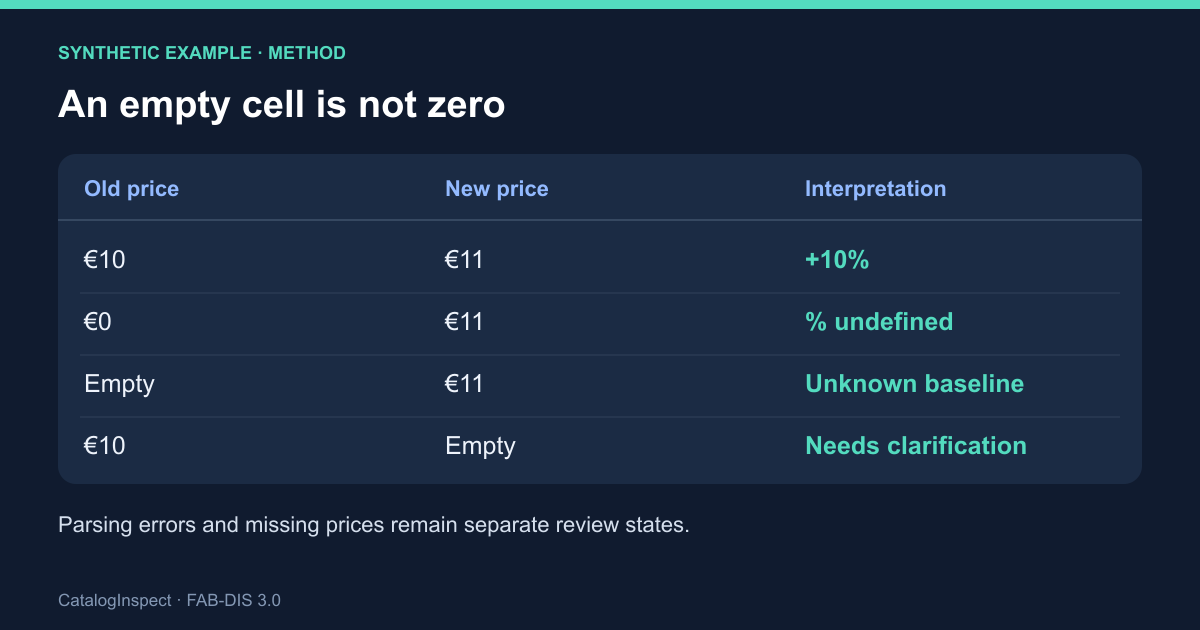
| €10.00 | €11.00 | +€1.00 and +10% |
| €10.00 | €0.00 | −€10.00 and −100%; confirm the explicit zero |
| €0.00 | €11.00 | +€11.00; percentage undefined |
| Empty | €11.00 | Price supplied; unknown baseline |
| €10.00 | Empty | Price now missing |
| Empty | Empty | No price information in either edition |
| “On request” | €11.00 | State change requiring explanation |
| €10.00 | abc | New value unreadable; keep the text and raise a data question |
These are synthetic examples. They do not imply that free-text prices or zero values satisfy every FAB-DIS reference type. Check the relevant source field before deciding whether a state is acceptable.
What is the percentage change when the old price is zero?
It is undefined. The formula (new − old) / old × 100 needs a non-zero baseline, so moving from €0.00 to €11.00 is not a 100% increase, and it is not an infinite one either. Report the absolute difference (+€11.00), leave the percentage empty and add a reason such as “zero baseline” or the common “n/m” (not meaningful) label.
What if the old price is blank?
Then there is no baseline at all. Subtracting an empty old price as if it were zero would report a +€11.00 rise that may never have happened. Mark the row “price supplied, unknown baseline” and keep it out of every average.
Keep the source value beside the parsed value
Use separate columns for the original cell, the interpreted amount and its state. Retain the source sheet and row so that a reviewer can inspect the evidence. If a conversion fails, preserve that failure instead of substituting zero.
Set the confirmed decimal and grouping conventions explicitly, and test conversion against known source values. Decimal and grouping symbols depend on the locale, as the Unicode number formatting rules describe: removing the comma from 12,50 would turn 12.50 into 1250. The guide to converting decimal-comma prices with a locale covers that step in detail.
Useful states include positive numeric amount, explicit zero, empty and invalid. Negative amounts should enter a separate business review unless the field’s documented meaning permits them. A credit adjustment is not automatically a valid unit price.
A small synthetic parsing test can use the source text 12,50, a confirmed decimal-comma convention and an expected numeric amount of 12.50. Add abc, which must retain an invalid state, and an empty cell, which must retain a missing state. Add a cell containing a single space too: it looks empty but is text, so decide once whether it counts as empty and apply that rule everywhere. Inspect the amount and the state together. Merely suppressing conversion errors would not show whether the process removed punctuation or invented zero values.
Do not hide exceptions in a fallback formula
A blanket error handler that returns 0 collapses several different situations: unchanged valid prices, missing values and impossible calculations. Use an empty numeric result plus an explicit exception reason where the percentage cannot be calculated.
“Empty to empty” should remain distinguishable too. It means there is no price information in either edition, not that a valid price has been confirmed unchanged. If the reference is legitimately unpriced, record the evidence that supports that interpretation.
Keep absolute differences separate from percentage changes. An absolute change may be available for two explicit numeric values even where the old amount is zero. Conversely, subtracting an empty baseline as if it were zero is an assumption and should not enter the report silently.
Does a zero price mean the item is supplied at no charge?
Not necessarily. A zero in a supplier price list can be a genuine no-charge item, such as a sample or an accessory included with another product, but it can also be a placeholder for “price not set”, an export default or a conversion that went wrong upstream. The cell alone cannot tell you which.
Treat every new zero as a question until a source confirms it. Check whether the same product code had a positive price in the previous edition, whether the reference is a service or a component sold only within a kit, and whether the price unit changed at the same time. A €10.00 price that becomes €0.00 is the transition most likely to be an error, and it should never reach an order or an ERP import unchecked.
What does “price on request” mean in a price list?
“On request”, “POA” or a similar note means the supplier gives the price by quotation rather than in the list. It is a commercial status, so keep it as text with its own state, never as zero and never as an invalid amount.
When a row moves from a listed price to “on request”, or the other way round, record it as a state change. Ask purchasing whether a quotation is needed for current orders, and keep the last confirmed price separate from any new quoted price.
Send a precise question to the right owner
For each unresolved row, include brand, product code, source values, price unit and edition dates. Ask whether the missing amount is intentional, whether a quotation is required or whether a corrected value will be supplied.
Send a documented parsing error to the data team. Send a commercial status such as “On request” to purchasing or the manufacturer for confirmation. Keep the original text and the decision beside the row. If the edition also changes effective dates, check the supplier price effective dates for overlaps and gaps before you decide which price applies.
Keep the overall result honest
Calculate percentage statistics only across rows with compatible amounts and a positive old baseline. Publish the number of zero, empty and invalid values alongside the result. When reporting weighted purchasing impact, also show the excluded historical spend and basket coverage wherever it can be valued.
A fictitious example: an edition of 1,200 product codes gives 1,140 rows with two positive amounts, 22 explicit zeros, 31 empty prices and 7 invalid values. The average change is calculated on the 1,140 comparable rows, and the report states that 60 rows, or 5%, were excluded and why. A reader then knows what the average covers instead of assuming it covers the whole list.
An unresolved item should remain visible until clarified. It need not block independent, already checked rows, but its price should not be released simply because a summary average looks plausible. The sample difference report on the features page shows where price review sits alongside product code and packaging changes.
Frequently asked questions
Should a blank price be treated as zero?
No. A blank cell means the price is unknown, while zero is a stated value. Treating a blank as zero creates price changes that never happened and distorts any average.
What is the percentage change when the old price is zero?
It is undefined, because the formula divides by the old price. Report the absolute difference, leave the percentage empty and give a reason such as zero baseline.
Does a zero price in a supplier price list mean no charge?
Not always. A zero can be a genuine no-charge item, a placeholder or a conversion error, so confirm it with the supplier before using it.
How should price on request be handled in a price comparison?
Keep it as a text status with its own label, not as zero or as an invalid amount. Record any move between a listed price and price on request as a state change for purchasing to confirm.
Can a FAB-DIS reference have no price?
Yes. The FAB-DIS guide describes references as items or services, with or without a price. Check the reference type before treating an empty price as an error.
Official sources & scope
- FAB-DIS — Blocs obligatoires (new tab)Accessed on
- Unicode — Number formatting (new tab)Accessed on
This guide describes a working method. The examples are fictional; the official documentation remains the reference for the format rules. CatalogInspect is an independent service.