In this guide 8 sections
Two supplier price effective dates overlap when the validity periods of two prices share at least one day for the same product, brand, currency, unit and market; a gap is a day that no period covers. To find which price applies on a given date, write every period with one end-date convention, keep only the periods that contain that date and count them: one candidate is the price to check against the agreement, two or more need a documented precedence rule.
The newest file in your inbox is not necessarily the price list that applies today. A delayed delivery, a future list or a correction can make receipt order misleading. This guide works through two editions from the same manufacturer with synthetic figures, then shows how to detect overlaps and gaps across many periods.
Which supplier price applies on a given date?
Work from the business date, not from the file. For each product:
- Choose the business date and the event that controls pricing under the agreement: order placement, delivery or another documented trigger.
- Fix the commercial key: manufacturer, brand, product code, currency, pricing unit, market and agreement. Identical product codes belonging to different brands never share a timeline.
- Write each price period as an inclusive start and an exclusive end,
[start, end), keeping the original dates beside it. - Keep the periods where the start is on or before the business date and the end is after it. A confirmed open end counts as covering the date.
- Count the candidates and classify the result.
| Candidates for the date | What it means | Next step |
|---|---|---|
| 0 | No documented price for that date | Confirm the source periods are complete before calling it a gap |
| 1 | One supported price | Check the amount against the agreement |
| 2 or more | Overlapping periods | Apply a documented precedence rule or ask the manufacturer |
Two active prices may be legitimate if they address different territories or contractual scopes, so first establish that both periods describe the same commercial situation. Only once the applicable price for each date is settled can you calculate the supplier price increase and weight it by purchase volumes without mixing an old price with one that applies only from a later date.
Receipt date, edition date and application date
Record four dates for each file: when it was received, its declared edition date, its declared application date and when your review took place. A download timestamp or a local file modification date cannot establish commercial applicability.
In a FAB-DIS 3.0 file, the FAB-DIS guide to mandatory blocks places DATEDIT and DATEAPPLI in the B00 CARTOUCHE block, which identifies the issuer, and states that neither can be earlier than the current date. A file can therefore reach you before the date from which it applies. These are file-level dates: check the edition notice and the commercial agreement to establish which event governs the price of a specific transaction.
When dates pass through a spreadsheet export, confirm the raw values before comparing periods. A workbook read with the wrong date system moves every date by 1,462 days, about four years, so diagnose a 1,462-day date shift first; an overlap calculated on shifted dates is meaningless.
Inclusive or exclusive end date?
Supplier wording such as “valid until 31 January” usually describes an inclusive last day. For calculation, an inclusive start and exclusive end, [start, end), is easier to test: a period ending at the start of 1 February does not include that day, and the next period can start on 1 February without overlapping. This is a calculation convention for the example, not a FAB-DIS requirement.
| Declared wording (synthetic) | Inclusive last day | Exclusive end used in the review |
|---|---|---|
| Valid from 1 January to 31 January 2027 | 31 January 2027 | 1 February 2027 |
| Valid until further notice | none (confirmed open end) | open |
| End date blank, not confirmed | unknown | set aside for confirmation |
Write the convention above the table. For date-only values, add one calendar day to a confirmed inclusive last day to obtain the exclusive end, and retain the original declaration. Do not add an invented time of day to a date-only declaration.
How to detect a price effective date overlap
With half-open periods [s1, e1) and [s2, e2), two periods overlap when each starts before the other ends: s1 < e2 and s2 < e1. The number of overlapping days is the earlier end minus the later start. When the first period ends on or before the second starts, the gap in days is the second start minus the first end; zero means the periods are contiguous.
| Synthetic edition | Inclusive start | Exclusive end | Item A price |
|---|---|---|---|
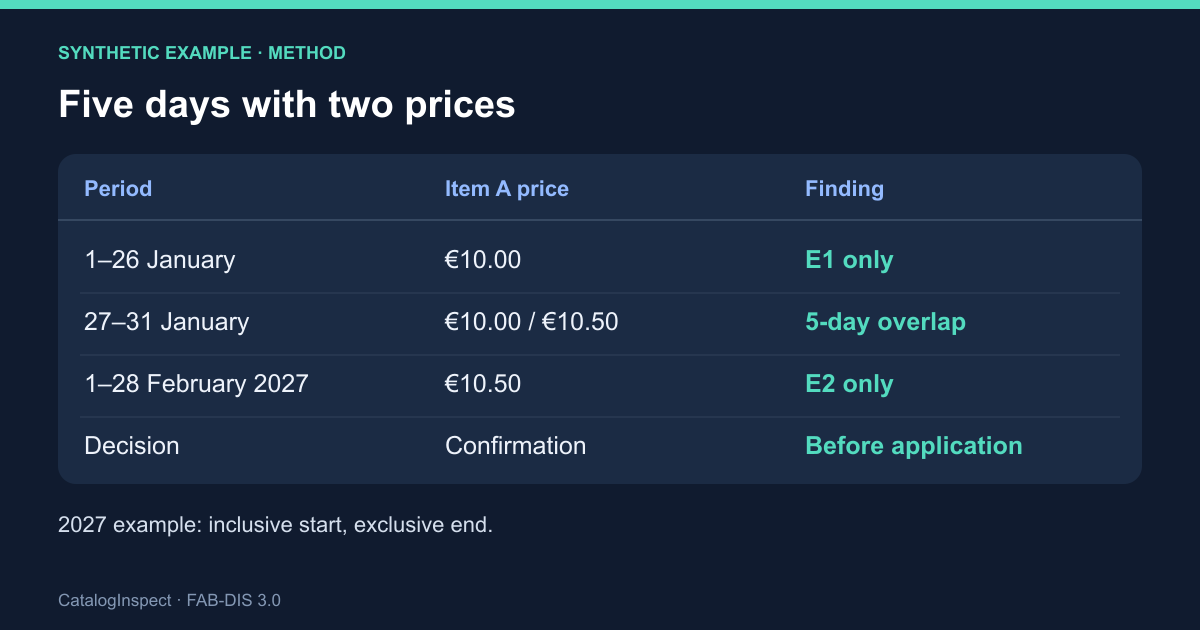
| E1 | 1 January 2027 | 1 February 2027 | €10.00 |
| E2 | 27 January 2027 | 1 March 2027 | €10.50 |
The earlier end is 1 February and the later start is 27 January: 27–31 January, five days, are covered twice. For an order on 29 January the table gives two candidate prices, €10.00 and €10.50, and file receipt order cannot decide which commercial rule takes precedence.
A gap needs equal attention. If E1 ends at the start of 1 February and E2 starts on 3 February, 1 and 2 February have no documented period. Continuing the previous price may be an approved operating decision, but the two files do not prove that it remains valid.
Check several periods without inventing gaps
Before sorting, set aside periods with a missing or unreadable start, an unreadable end or an unconfirmed blank end. An end before the start is invalid. A half-open period such as [27 January, 27 January) is empty and contributes no coverage. A confirmed open end is allowed and keeps coverage open.
Within each confirmed commercial key, sort periods by start and retain the latest end reached by all previously examined periods. Compare the next start with that accumulated coverage rather than only the preceding row’s end. With half-open periods, a smaller start overlaps, an equal start continues and a larger start leaves a gap.
In a synthetic example, [1 January, 1 February), [5 January, 11 January) and [15 January, 21 January) are nested within the first period. The accumulated end remains 1 February after every row. There are overlaps, but no uncovered dates from 11 to 14 January. Comparing only the last two rows would invent that gap. This detects conflicting coverage; it does not decide which contractual price takes precedence.
How to resolve an overlap
An overlap is a question for the agreement, not for the spreadsheet. Ask whether E2 supersedes E1 from 27 January, covers a different scope or contains an incorrect date, then save the answer with the affected product codes and market. Common rules to document are:
- Later start supersedes: the new edition replaces the earlier price from its start date, so E1 is closed at the start of 27 January.
- Narrower scope wins: a price for a specific market, project or agreement takes precedence over the general list for that scope only.
- Date correction: one of the declared dates is wrong; the manufacturer confirms the corrected date and both originals stay on file.
Do not infer that a new edition automatically ends every earlier value, particularly where the new file is only a partial extract. A verbal assumption copied into a spreadsheet is difficult for another reviewer to verify later.
Future price lists and the system update
Group rows into applicable now, applicable from a later date and unresolved. A generic application date may not resolve every contractual case, so keep the controlling event from the first step beside each row.
If your ERP stores future prices, check how its particular version handles date boundaries and time zones, and include these lines in your ERP catalogue update acceptance checks. Test the boundary dates explicitly, such as the last day of E1 and the first day of E2, rather than only a convenient date in the middle of a period.
Record the decision, not only the resulting amount
For each commercial key and business date, record the source periods, the number of valid candidates, the precedence rule applied, the owner and the review date of any temporary exception. Where no applicable amount is confirmed, keep the unknown price separate from zero. A later correction should leave the prior decision traceable.
This chronology complements a difference report between two catalogue editions: a price difference may be correctly identified yet applied at the wrong time. The useful outcome is a supported price for a defined date and scope, with ambiguity visible before the update reaches purchasing or quotations.
Frequently asked questions
What is a price effective date?
A price effective date is the first day on which a price applies to an order or delivery under the supplier’s terms. It differs from the date the price list was issued or received.
Is the end date of a price validity period inclusive?
It depends on the supplier’s wording and on your system. Write your convention down and convert a confirmed inclusive last day into an exclusive end by adding one calendar day.
What happens when two supplier prices overlap?
For the overlapping days, the files support two candidate prices. Confirm with the agreement whether the later list supersedes the earlier one, covers a different scope or contains a date error, and record the rule you apply.
How do you check whether two date ranges overlap?
With an inclusive start and an exclusive end, two periods overlap when each one starts before the other ends. The number of overlapping days is the earlier end minus the later start.
Does a new price list automatically end the previous one?
Not necessarily. A partial extract or a price for another market can leave earlier prices valid, so close a previous period only when the supplier’s notice or agreement says so.
Official sources & scope
- FAB-DIS — Blocs obligatoires (new tab)Accessed on
This guide describes a working method. The examples are fictional; the official documentation remains the reference for the format rules. CatalogInspect is an independent service.