In this guide 9 sections
An approval matrix for supplier catalogue changes says, for each type of change between two catalogue editions, who decides, what evidence that person needs and what stays on hold until the decision is made. Give every significant change one closing owner, attach the old and new values with the evidence requested, and release only the changes whose decision is complete. A blanket “catalogue approved” status cannot show what was actually checked.
The method below organises the review of two FAB-DIS 3.0 editions from the same manufacturer. The matrix is an internal working document kept in your own tools: it is not a certification and it adds no requirement to the format.
What an approval matrix for catalogue changes contains
Each row describes a type of change, not a department. Five columns are enough for most teams: the change, the closing owner, who supports the decision, the minimum evidence and what is held while the question is open.
| Synthetic change | Where it sits in FAB-DIS 3.0 | Closing owner | Support | Minimum evidence | Held until closed |
|---|---|---|---|---|---|
| Changed price | Commercial data (B01 COMMERCE) | Purchasing | Data, for the pricing unit | Agreement, pricing unit and effective date | The affected price |
| Ambiguous product identity | Commercial data (B01 COMMERCE) | Data | Manufacturer | Manufacturer-confirmed product code | The whole item |
| Changed dimensions or weight | Logistics data (B02 LOGISTIQUE) | Logistics | Data, for units | Unit and value confirmed for the pack level | Logistics fields |
| Changed order multiple | Depends on your mapping | Logistics | Purchasing, for terms | Unit and quantity rule | The ordering parameter |
| Technical feature or ETIM class change | ETIM block (C04 ETIM) | Product specialist | Data | Applicable document, ETIM version | Technical publication |
| Discontinued item with a replacement | ARRET and SUBSTITUTION blocks (C05, C06) | Purchasing | Data, Logistics | Replacement code present in the commercial data | Both codes |
The block names come from the public FAB-DIS 3.0 guide: logistics data such as dimensions, weight and multi-pack handling sit in B02 LOGISTIQUE, and media and regulatory data have their own blocks (B03 MEDIA, B04 REGLEMENTAIRE), which you can add as rows if they matter to your publication. Adapt the hold column to your system: if your import cannot separate prices from technical data, a field-level hold becomes an item-level or batch-level hold.
Format conformity is not business approval
The official FAB-DIS guide describes the data model and the steps for producing a conforming file; a structure check run by the manufacturer answers whether the file follows that model. Your matrix answers other questions: does the price match the agreement, is the order quantity acceptable for your warehouse, does the document apply to the right variant? For what a FAB-DIS 3.0 file contains and how comparison differs from conformity, see the format questions page.
Keep both kinds of evidence without letting one stand in for the other. A conforming file does not approve your purchasing policy, and purchasing approval does not make a file conform to the format.
Before the review starts, record the brands, the two source editions, the dates carried in their B00 CARTOUCHE block (DATEDIT, DATEAPPLI) and the destination system. This boundary stops an approval from being reused later for a different file. Once decisions are made, the ERP supplier catalogue import acceptance checklist verifies what the destination actually stores.
Who decides: one accountable owner per change
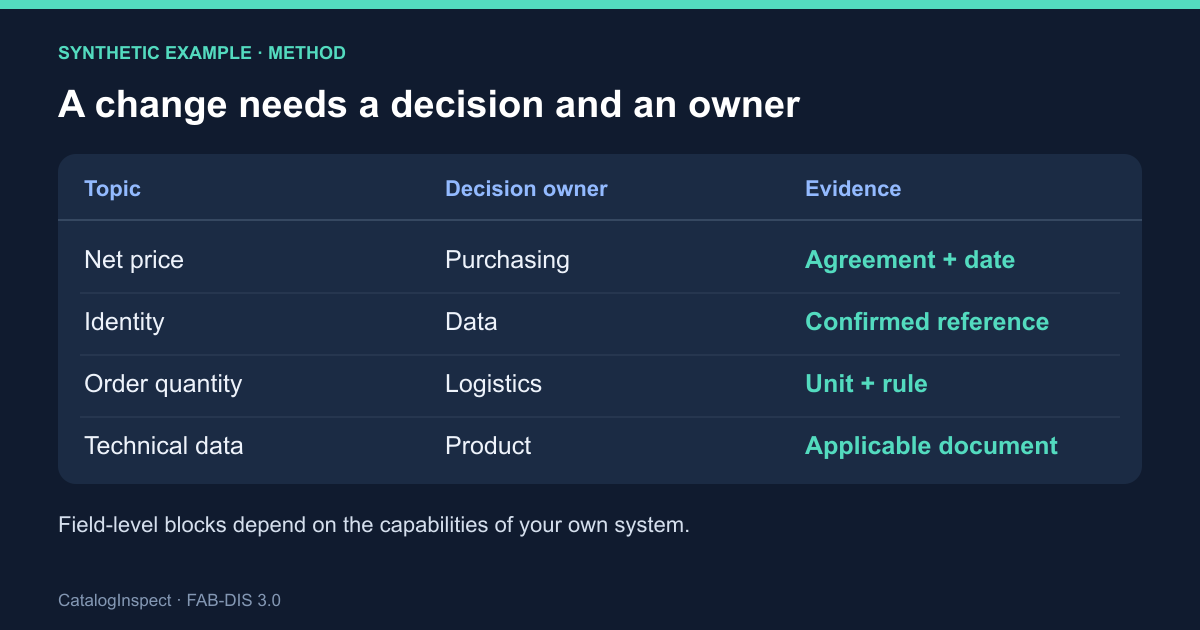
A RACI split (Responsible, Accountable, Consulted, Informed) works well for catalogue updates, provided each row has exactly one accountable person. Several functions can contribute; only one closes the decision. Otherwise purchasing assumes logistics accepted a quantity rule while logistics assumes purchasing accepted its cost, and nobody owns the outcome.
| Synthetic change | Purchasing | Data | Logistics | Product specialist |
|---|---|---|---|---|
| Net price | A | C | I | I |
| Product identity | C | A | I | I |
| Order multiple | C | I | A | I |
| Technical feature | I | C | I | A |
“A” closes the issue and signs the decision; “C” supplies evidence; “I” is told the result. The person who prepares the batch is usually Responsible for every row, but Responsible is not Accountable. Review the matrix when teams or roles change, so a row never points to someone who no longer decides.
For the purchasing row, calculate the applicable net purchase cost from confirmed terms. For an ambiguous identity, check the original product code and the matching evidence before approving any derived price or quantity. These are different evidence requests, even when one person owns both decisions.
What evidence each change needs
Send each issue with the old and new values, their position in both editions, one precise question and the evidence already available. A reviewer should not have to rebuild the problem from a cropped screenshot or a vague request to “approve the catalogue”. A focused question such as “confirm the 24-unit minimum for REF-A from 1 February” produces evidence that is easier to keep and apply than a general approval email.
A filled, fictitious issue record could read:
| Field | Synthetic value |
|---|---|
| Product code | REF-A |
| Change | Net price 10.00 → 11.00 |
| Open point | Pricing unit unconfirmed in the new edition |
| Closing owner | Purchasing |
| Evidence requested | Manufacturer confirmation of the pricing unit and effective date |
| State | Confirmation requested |
| Hold | Affected price |
| Internal review date | 2 February |
The review date is an internal deadline, not a promised supplier response. Keep the difference in amount separate from the percentage: if the agreement confirms that both prices are for the same item and pricing unit, 10.00 to 11.00 is +10%. While the unit and effective date are unconfirmed, the percentage and the price application stay on hold. If the identity of REF-A is also in doubt, the hold extends to every comparison that depends on it.
Approval states and temporary exceptions
A short list of states covers most cases: awaiting review, confirmation requested, accepted, rejected and temporary exception. Each rejection carries a reason, so the supplier or the data team knows what to correct.
Every temporary exception needs a defined scope and an expiry or review date. Without them, a one-off import quietly turns the exception into permanent approval.
Count changes by state and by importance. “98% accepted” does not authorise release if the remaining 2% contain critical identities or a shared price rule that affects other rows. Low-impact changes can be grouped under one approved rule, provided the rule states what it covers, when it must be escalated and which product codes it included.
Partial release: approving part of a catalogue update
If your tools allow it, release the accepted changes and hold the rest. Check dependencies first: an accepted product may rely on an accessory still on hold, or a shared price rule may affect both groups. Replacements need the same care. The FAB-DIS guide expects the replaced code in the ARRET block and its replacement in COMMERCE, so approve the two together and review the supersession chain before releasing either.
For REF-A, hold the price and any dependent fields. If the destination imports the whole item as one record, exclude REF-A from the released batch. If it can only apply an indivisible batch, hold that batch.
Record, for each release: the batch version, the approval date, the effective date, the closing owners and the exclusions. After a correction from the manufacturer, reopen only the affected issues and their dependencies, and keep the earlier decision history.
Approval matrix checklist
- Scope fixed: brands, two source editions, dates, destination system.
- Every significant change assigned to a row with one closing owner.
- Each issue sent with old and new values, one question and the evidence requested.
- Holds defined at the level your system can actually enforce: field, item or batch.
- Temporary exceptions scoped and dated.
- Dependencies and replacement pairs checked before a partial release.
- Released version, exclusions and owners recorded before the import.
Hand over decisions the import team can execute
The final record links each significant change to one action: apply, hold temporarily, request a correction or exclude from the batch. The evidence and the scope sit beside that action, so the team running the import does not need to interpret anyone’s email.
The catalogue difference report feeds the matrix at the start: it shows which product codes were added, which are missing from the new edition and which fields changed, so purchasing, data, logistics and product teams each receive the rows they own.
Frequently asked questions
What is an approval matrix for supplier catalogue changes?
It is a table that assigns each type of catalogue change to one person who decides, with the evidence required and what stays on hold until the decision is made. It is kept in your own tools and records business decisions, not format conformity.
Who should approve supplier price changes?
Purchasing usually closes price changes because it holds the agreement and the effective date. The data team supports the decision by confirming the pricing unit and the product identity.
Can you release part of a supplier catalogue update?
Yes, if your destination system can apply changes field by field or item by item and the accepted changes do not depend on rows still on hold. If it can only import an indivisible batch, the whole batch waits.
Does a FAB-DIS structure check approve the catalogue for use?
No. A structure check tells you whether the file follows the FAB-DIS model, while your approval matrix records whether prices, quantities and technical data are acceptable for your business.
How should a temporary exception be recorded?
Give it a defined scope, a named owner and an expiry or review date. Without a date, a one-off exception tends to become permanent approval.
Official sources & scope
- FAB-DIS — Le Guide FAB-DIS (new tab)Accessed on
This guide describes a working method. The examples are fictional; the official documentation remains the reference for the format rules. CatalogInspect is an independent service.