In this guide 7 sections
Before you compare two supplier catalogue editions, establish whether the new file is a full catalogue, a partial extract or a changes-only delivery, and compare only the ranges that both editions cover. A product code missing from a partial file tells you nothing about whether that product is still sold.
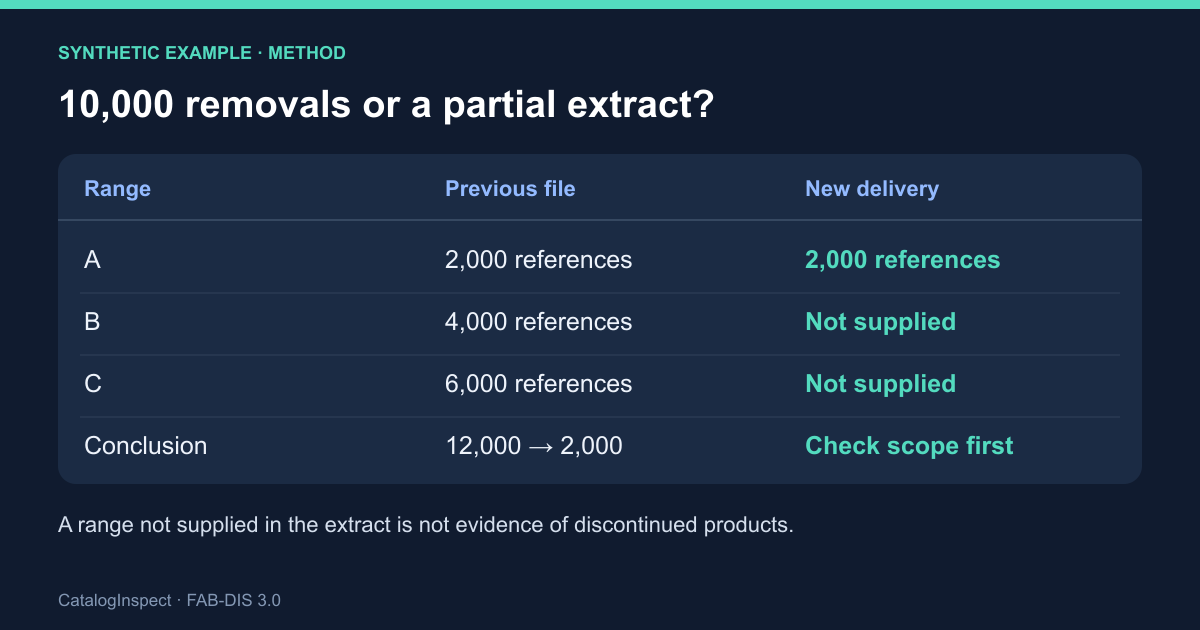
Take a fictitious case: the previous edition held 12,000 product codes and the new file holds 2,000. That does not mean 10,000 products were dropped. It may simply mean the manufacturer sent one range out of three. The steps below set the comparison scope first, so the added, missing and changed counts that follow, whether they come from a spreadsheet or from a supplier catalogue comparison, can support a decision.
Is the new file a full catalogue, a partial extract or changes only?
Start by describing what each edition covers: brands, ranges, markets, effective dates and any selection criteria the sender applied. Then count distinct product codes within each group, in both editions, after normalising the product codes so leading zeros and spaces cannot split one item into two.
A filename such as full_catalogue_final.xlsx is not proof of exhaustive coverage. “Full” may mean full for one brand, one country or one sales channel. The useful question to the sender is: complete against which expected set?
In a FAB-DIS 3.0 file, the B00 Cartouche block identifies the issuer, the brands and the format version, and the official guide asks you to check that every brand in the catalogue is declared there. Comparing the declared brands of the two editions is a quick first scope check. For what else a FAB-DIS 3.0 file contains, see what a FAB-DIS 3.0 file contains.
Record the delivery type in plain words, because it decides what an absent row means:
| Delivery type (confirmed with the sender) | What an absent product code means | Conclusion you can draw |
|---|---|---|
| Full snapshot of the ranges declared | Missing from the expected current set | Investigate the absence and its commercial status |
| Partial extract (some ranges only) | Outside the delivery if its range is absent | No conclusion for ranges not supplied |
| Changes-only delivery under an agreed rule | Not among the transmitted changes | No removal inferred from omission |
| Type or scope unknown | Not established | No assortment conclusion; ask the sender |
These are internal decision cases, not FAB-DIS field definitions. The word “correction” on a file does not settle which case applies: a corrected file can replace the whole earlier edition or only the records it contains.
Once the scope is clear, the matching itself follows the method for finding items missing from the new price list: one list of all keys from both editions, then a status for each key.
Does a missing row mean the product is discontinued?
No. A missing row is a fact about the file; discontinuation is a commercial decision that needs its own evidence. Within a confirmed full snapshot, an absence is a strong signal worth investigating. Within a partial extract or a changes-only file, it is not a signal at all. Before any absence leads to a deactivation in your ERP, run it through the acceptance checks for an ERP catalogue import.
FAB-DIS 3.0 gives you a positive source to look for. The official guide describes a conditional ARRET block that lists products withdrawn from sale, and a SUBSTITUTION block for the replacement, with the rule that the replaced product sits in ARRET and its successor in COMMERCE. A code that appears in ARRET is a stated withdrawal. A code that is simply absent from COMMERCE, with no ARRET entry, is only an absence.
Keep the two apart in your report: “withdrawn according to the file” and “missing from the new edition, status to confirm”. The sample difference report between two editions shows how added and missing codes appear next to price and pack size changes.
Build a scope matrix before counting differences
A scope matrix puts the coverage of each range side by side. In this synthetic example, only range A is comparable:
| Synthetic range | Previous edition | New edition | Missing-row interpretation |
|---|---|---|---|
| A | 2,000 product codes | 2,000 product codes | Meaningful if completeness is confirmed |
| B | 4,000 product codes | Not supplied | Cannot infer removal |
| C | 6,000 product codes | Not supplied | Cannot infer removal |
| Received total | 12,000 product codes | 2,000 product codes | Major scope difference |
Equal counts for range A do not prove identical membership. With 10 codes dropped and 10 added, range A still shows 2,000 on both sides: 1,990 common codes plus 10 old-only in the previous edition, and 1,990 common codes plus 10 new-only in the new one. Report both movements rather than concluding that a stable total means a stable range.
The matrix tells you where a detailed comparison is meaningful, not what it will find. Before counting, normalise the product codes used as the matching key, otherwise 0042 and 42 turn one product into one missing and one added item. Where the identifier itself changed, review the changed GTIN and its packaging context.
Compare only the subset both editions cover
Identify the groups whose coverage is confirmed in both editions. Within those groups, take the union of old and new keys, including keys present on one side only, and assign each one a status. Report groups supplied in one edition only, and groups of unknown completeness, in a separate section.
If no range has confirmed coverage on both sides, ask the manufacturer for aligned extracts or for the complete files. You can still review prices on the codes present in both files, but that intersection cannot measure additions or absences. Label the result for what it is, for example “price review on matched codes only”.
An intersection-only comparison often looks reassuring because every row has a counterpart. Its limitation is exactly that: it leaves out the rows you need to assess range movement.
How does your ERP import treat rows that are not in the file?
Before any update, find out what the specific import operation does with records that are not in the file. Some operations update only the rows supplied; others treat the file as the complete desired state and deactivate or delete everything else. The same partial extract can be safe for one operation and harmful for another.
Test the intended operation in a non-production environment and check that out-of-scope products remain unchanged:
- Keep a list of the ranges that must not change (here B and C).
- Include one approved price change in range A.
- Choose an existing product in range B as a control.
- After the test import, read the price and the active status of that control product.
- Any unexpected change to the control blocks approval of the import settings.
A button labelled “synchronise” does not tell you whether absent rows are deactivated. Confirming that the supplied rows imported correctly is not enough; the control is what proves the rest was left alone. For acceptance of the approved batch, follow the ERP supplier catalogue import checklist.
State the scope before the headline count
Open your conclusion with the scope, then the numbers: “Range A compared with confirmed coverage; ranges B and C not supplied in the new edition. Range A: 1,990 matched, 10 missing from the new edition, 10 added.” Add unresolved identities and open questions about completeness.
A precise question to the manufacturer usually produces either a confirmation that the file is complete or a replacement extract covering the same scope. Either is better evidence than reading every absent row as a removal. Once the scope is framed, a supplier catalogue comparison of the two editions gives you differences whose coverage supports a decision.
Frequently asked questions
What is the difference between a full catalogue and a partial catalogue file?
A full catalogue file covers every product the supplier currently offers within the declared brands and ranges. A partial file covers only some ranges, brands or markets, so products outside it are neither confirmed nor removed.
Does a product missing from a new supplier file mean it is discontinued?
Not on its own. In a confirmed full snapshot, an absence is worth investigating; in a partial or changes-only file it means nothing about the product. In FAB-DIS 3.0, a withdrawn product is expected in the ARRET block, which is stronger evidence than an absence.
How do I know whether a supplier file is complete?
Compare the brands, ranges and markets declared in each edition, count product codes per range, and ask the sender which expected set the file is complete against. A filename containing “full” is not proof of coverage.
Can I compare a partial extract with a full catalogue?
Yes, but only on the ranges present in both files. Report the other ranges separately as not supplied, and do not count their missing rows as removals.
Will an ERP import delete products that are not in the file?
It depends on the import operation. Some update only the rows supplied, others treat the file as the complete list; test it in a non-production environment with an out-of-scope control product before importing for real.
Official sources & scope
- FAB-DIS — Guide officiel 3.0 (new tab)Accessed on
This guide describes a working method. The examples are fictional; the official documentation remains the reference for the format rules. CatalogInspect is an independent service.