In this guide 8 sections
To check a technical datasheet revision, open the PDF actually served at the catalogue URL and compare its declared revision, date, language and covered variants with the copy you approved last time. A stable URL is only a location: the manufacturer can replace the file behind it, so confirm any change with a file hash and a reading of the passages that matter.
The reverse is also true: a new URL can serve exactly the same document. This guide covers the review of technical datasheets and instructions between two FAB-DIS 3.0 editions from one manufacturer (FAB-DIS is the French product data exchange format used between manufacturers and distributors). It does not replace a regulatory assessment of the product.
What counts as a technical datasheet revision?
A revision is a new state of the document published by the manufacturer. It usually shows up as a new revision number or letter, a new document date or a new entry in the revision history. It can be editorial (layout, typo, translation), technical (a limit, a dimension, an installation condition) or a change of scope (variants added or removed from the reference table).
Avoid reading meaning into the number alone. “Revision 3” may cover a corrected typo, a new variant or a substantial technical update; only the manufacturer’s evidence and the changed passages tell you which. A download date belongs to your internal tracking record. It is not a manufacturer revision date unless the source explicitly establishes that link.
In a FAB-DIS file, documents are attached through the media block. The FAB-DIS mandatory-block guide describes B03 Media, with media such as photos, tutorial videos, brochures and diagrams, and the option to assign a language or a target to some of them. For the other blocks and versions, see what a FAB-DIS 3.0 file contains. Language changes need their own review: the multilingual product description checklist covers missing and outdated languages.
How to check whether a datasheet changed at the same URL
- Record the identity of the document. For each product code, note the media role, original URL, final URL after any redirect, language, title, declared revision, document date and variants covered.
- Open the document that was actually served. A successful response can still lead to another language, another variant or another document type.
- Compare file hashes with your archived copy. Compute SHA-256, specified in the NIST Secure Hash Standard, for the previous approved copy and the new one. Identical hashes mean identical bytes. Different hashes only tell you that something in the file changed.
- Compare the revision block and the revision history. Check the revision number, date and history entries of both copies.
- Read the passages that drive decisions. Compare dimensions, performance tables, limits, installation conditions and compatibility on the rendered pages of both copies.
- Record the finding. Note the page and section of each change so that another person can reproduce it.
Step 3 needs a previous copy you are authorised to keep. Without it, you can only describe the current document, not prove what changed. The guide to archiving catalogue editions with a SHA-256 hash explains what to keep and how to verify archive copies.
On the catalogue side, the sample difference report with media and document links shows which photo, instruction and document fields were added, removed or replaced between two FAB-DIS 3.0 editions. That report flags the field; it does not open the PDF. Steps 2 to 5 remain a document review.
Why a stable URL does not guarantee the same datasheet
A manufacturer can replace a PDF at the same address. HTTP headers give hints, not proof.
- ETag. An entity tag identifies the representation the server selected. A weak validator, whose ETag starts with
W/, might not change for every change to the data. A strong one changes when the data changes, but the same strong ETag used by two different resources does not mean their documents are equivalent. - Last-Modified. The Last-Modified header is the time at which the server believes the file was last modified. It tells you when the server’s copy changed, not what changed in the document.
- File hash. A hash of each archived copy compares bytes across locations and dates. It is the reliable test for “same file or not”.
Two copies with different hashes can still carry the same technical content. Compression, embedded metadata or a regenerated PDF change the bytes without changing a single instruction. Text extraction has the opposite weakness: it can miss diagrams, footnotes and table relationships, so identical extracted text does not prove that two PDFs are technically equivalent. Read the rendered pages for important passages.
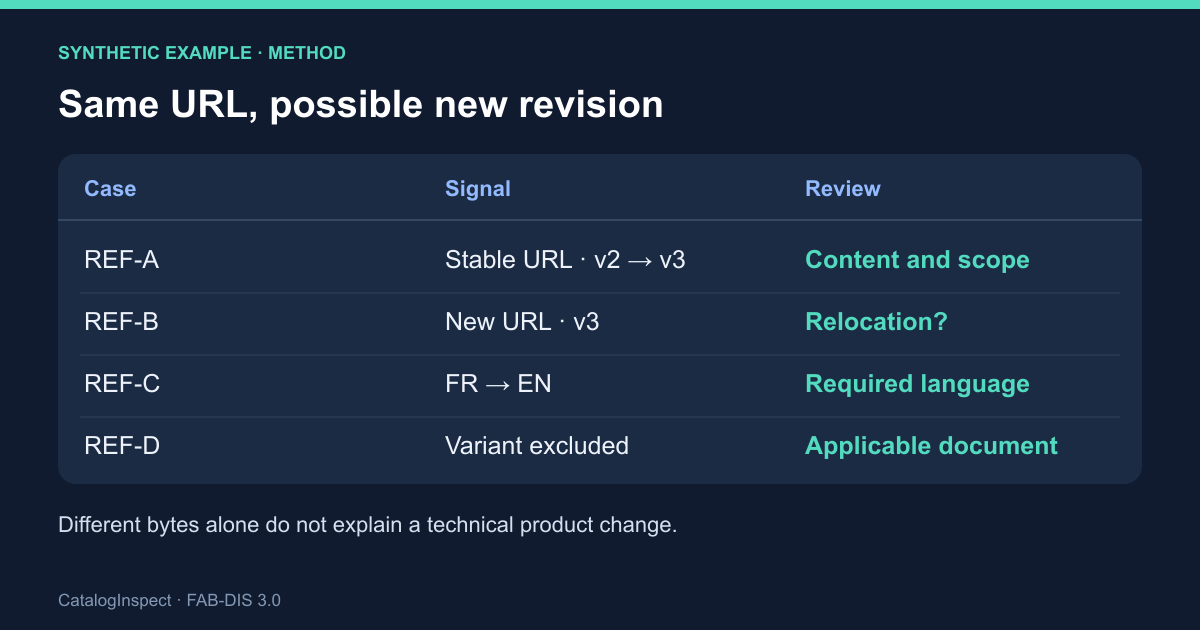
Same URL, new URL: four cases to review
| Synthetic case | Observation | Review needed |
|---|---|---|
| REF-A | Same URL, revision 2 becomes 3 | Read the changes and their applicability |
| REF-B | New URL, same revision | Compare hashes: relocation or content difference? |
| REF-C | French sheet replaced by English | Check the language required for the market |
| REF-D | New sheet excludes variant D | Obtain the document that applies to D |
These cases need different owners and decisions. A single “media changed” flag cannot say whether the issue is technical, editorial, linguistic or related to product coverage. For REF-B, matching hashes close the question as a relocation; different hashes send it back to step 4.
Which sections of a datasheet to compare
Synthetic REF-A record, variant V: revision 2, page 4, “Installation”, maximum length 2.0 m; revision 3, page 5, same section, 1.8 m. The published limit decreases by 0.2 m, or 10%. Keep both passages and ask the product owner whether the new limit also covers items already installed or only a particular version or batch. Decision: confirmation requested. This example is fictitious and establishes no real technical rule.
Prioritise the passages that change what someone orders, installs or promises:
- dimensions and tolerances, after checking units and dimensional meaning;
- performance tables and operating limits;
- installation conditions, restrictions and warnings;
- compatibility with accessories, spare parts and earlier variants;
- the reference table listing the variants covered.
A family datasheet may cover several variants. Check its reference table rather than assuming it applies to every catalogue row sharing the family name. A document for the previous variant can remain readable and still be the wrong document for the new one. A changed title may be cosmetic; a changed unit in a table may be consequential.
Does the new revision apply to products already supplied?
Ask the manufacturer whether the new datasheet covers all products previously supplied or only items made after a stated date, version or batch. Do not replace historical installation evidence without keeping the document that applies to the installed item.
Your public catalogue and your maintenance archive may legitimately need different revisions. Record the purpose and scope of each retained document instead of forcing one file to serve every context.
What to record when you approve a datasheet revision
The final record names the product code, the selected document, its revision, language, URL, SHA-256 hash, review date, inspected sections and owner. Missing or inapplicable documents stay visible as exceptions rather than being silently replaced.
If the approved catalogue then goes into your ERP, include these exceptions in the ERP catalogue import acceptance checks so that a document flagged for review is not published by default.
Frequently asked questions
Does a new datasheet revision mean the product changed?
Not necessarily. A revision can correct wording, layout or a translation without any change to the product. Only the changed passages and the manufacturer’s confirmation tell you whether the product itself is affected.
Can a PDF change without its URL changing?
Yes. A manufacturer can replace the file behind the same address at any time. Compare the hash and the revision details of the copy you approved with the copy served today.
Is an unchanged ETag proof that the datasheet is the same?
No. A weak ETag might not change for every change to the file, and an ETag is set by the server, not by the document. Comparing the SHA-256 hashes of your archived copies is the reliable byte test.
Why do two copies of the same datasheet have different hashes?
A regenerated PDF can differ in compression, embedded metadata or internal ordering while showing the same content. A different hash tells you to read the document again, not that its technical content changed.
Does CatalogInspect read the content of datasheets?
No. CatalogInspect compares the document and media link fields of two FAB-DIS 3.0 editions from the same manufacturer. Your team reviews the PDF contents and records which revision applies to each variant.
Official sources & scope
This guide describes a working method. The examples are fictional; the official documentation remains the reference for the format rules. CatalogInspect is an independent service.